
The fastest way to get more Google reviews is to generate your review link or QR code inside Google Business Profile, then ask within two hours of service with a short, personalized message that includes that link. Skip the incentives and skip asking for five stars. Speed and a light touch beat any clever script.
TL;DR:
- Generating and sharing review links or QR codes inside your Google Business Profile is quick and should be placed at high-visibility moments like receipts or confirmation emails.
- The most effective review requests are sent within two hours of service, with SMS being the highest-converting digital channel when messages are concise and personalized.
- Avoid incentivizing reviews or asking for five stars; Google policies prohibit offering rewards and mandate neutral, honest requests regardless of customer satisfaction.
- Track your review request metrics and respond promptly to new reviews to build trust and improve local search rankings, responding within 24 to 72 hours.
- Timing and placement matter far more than wording, so automate review requests at natural moments in the customer journey, such as loyalty signups or post-service follow-ups.
Table of Contents
- How Do You Create and Share a Google Review Request Link?
- When Should You Ask, and Which Channel Converts Best?
- What Review Request Templates Actually Get Results?
- What Are Google's Rules for Requesting Reviews?
- How Do You Track and Respond to Review Requests?
- A Real-World Example: Pairing Review Requests With Loyalty Signups
- Why Most Review Request Advice Misses the Point
- Sources
How Do You Create and Share a Google Review Request Link?
You build the whole system inside your Google Business Profile dashboard. No third-party tool is required to get started, though the wrong placement can waste the link you generate.
Open your profile, click Read Reviews, then select Get more reviews. Google gives you a short, shareable URL that drops customers directly onto your review form, skipping the search step entirely. You can also generate a scannable QR code from that same screen, though Google requires desktop browser access to create the QR image rather than a phone.
Once you have the link, the real work is putting it where customers will actually see it at the right moment. High-converting placements include:
- Printed and emailed receipts, right below the total
- Post-purchase or post-appointment confirmation emails
- Point-of-sale screens during checkout
- Table tents at restaurant checkout stations
- Appointment completion or discharge screens for service businesses
- Support chat closing messages after a resolved ticket
- A dedicated "Leave a Review" button on your website
Before you roll it out everywhere, run a quick implementation check: copy the exact link from Google Business Profile, shorten it if your SMS platform charges by character count, and add UTM tracking parameters if you want to see which channel drives the most clicks. Then test the link on both an iPhone and an Android device. Some QR scanners handle redirects differently, and a broken link at this stage kills the whole request before the customer even sees your message.
Pro Tip: Send SMS and email requests from a recognizable name, like your business name or the owner's first name, not a generic "no reply" address. People are far more likely to tap a link from someone they recognize.
When Should You Ask, and Which Channel Converts Best?
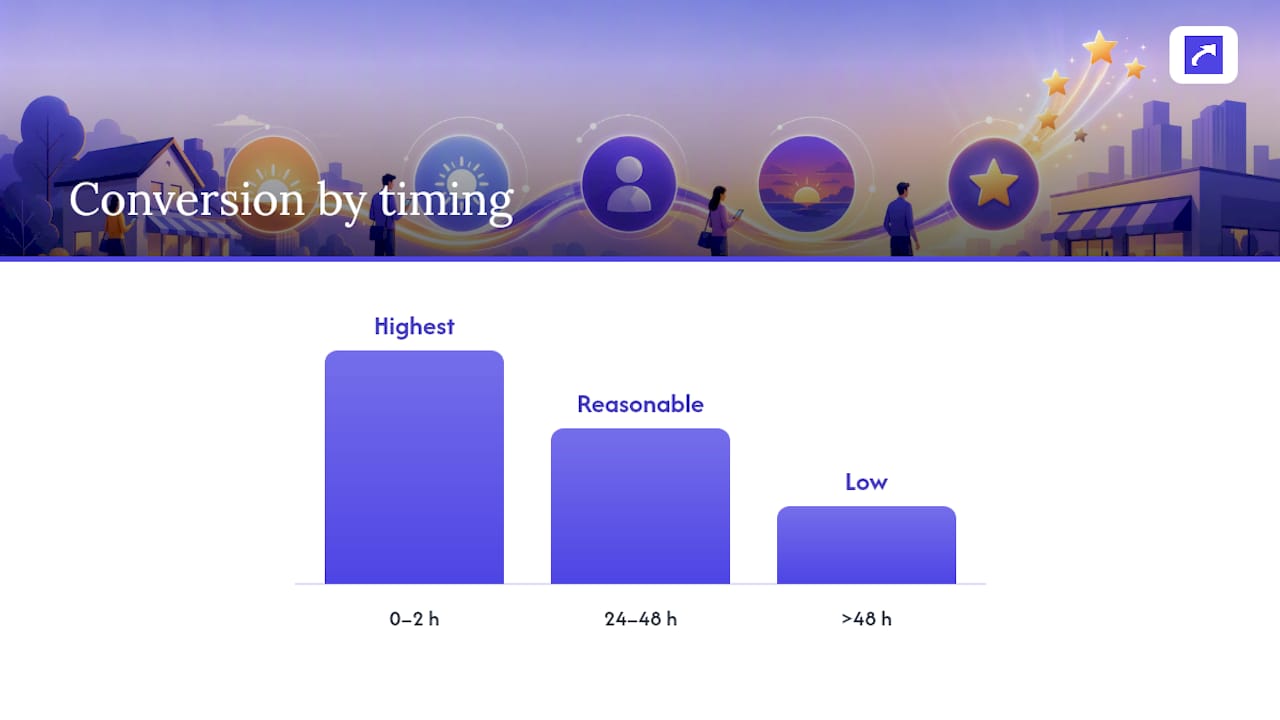
Timing beats almost everything else in this process. Requests sent within two hours of service consistently produce the highest conversion rates, while response rates hold up reasonably well through the 24 to 48 hour mark. After that window closes, conversion drops off fast. The moment of "wow" fades, and so does the motivation to open an app and type a review.
Different channels carry very different strengths:
- In-person plus QR code: the highest persuasion rate because you're asking a satisfied customer face to face, but it doesn't scale past the people physically in front of you.
- SMS: often the single highest-converting digital channel, especially when the message stays under 160 characters with one clean link and a personal tone.
- Email: scales to your entire customer list at almost no cost, but typically converts at a lower rate than SMS because inboxes are noisier and less urgent.
- WhatsApp or regional messaging apps: worth testing in markets where open rates on those platforms outpace standard SMS or email.
Follow-up matters, but restraint matters more. Send one polite reminder if the first request goes unanswered within 48 hours, then stop. Hitting the same customer with an SMS, an email, and a chat message for one transaction reads as desperate, and it can push someone from "maybe later" to actively annoyed.
If you're choosing one channel to prioritize first, pick whichever one already touches the customer naturally right after service, whether that's a text confirmation, a receipt email, or a face-to-face handoff.
What Review Request Templates Actually Get Results?
Copy-paste the template that matches your channel, swap in the bracketed details, and keep the tone conversational. Every version below assumes you already have your Google review link ready to drop in.
SMS templates (each under 160 characters):
- "Hi [Name], thanks for stopping by [Business]! Mind leaving us a quick Google review? [Link]"
- "Thanks for choosing [Business] for your [service]! A review helps us a ton: [Link]"
- "[Name] here, owner of [Business]. Loved having you in. Quick review? [Link]"
- "Glad we got that sorted for you! If you have 30 seconds, a review means the world: [Link]"
- "Hey [Name], it's been a week since your visit. Still time for a quick review: [Link]"
- "Haven't left a review yet? No pressure, just a friendly nudge: [Link]"
Email templates (subject lines first, then a short body):
Subject lines: "Got 30 seconds for us, [Name]?" / "How did we do?" / "One quick favor" / "Thanks for choosing [Business]"
- Post-purchase: "Hi [Name], thanks for your order! If you're happy with [product/service], a quick Google review helps other customers find us. [Button: Leave a Review]"
- Service completion: "Hi [Name], hope [service] went smoothly. Would you share your experience on Google? It takes less than a minute. [Button]"
- Owner note: "Hi [Name], I'm [Owner], and I personally read every review. If you had a good experience, I'd appreciate a few words on Google. [Button]"
- Post-resolution: "Hi [Name], thanks for your patience while we sorted that out. If you're satisfied with how it went, a review would mean a lot. [Button]"
- 7-day follow-up: "Hi [Name], just checking in a week after your visit. If you have a moment, we'd love your feedback on Google. [Button]"
Every email should include a one-line opt-out ("Don't want these emails? Unsubscribe here") to stay clean on consent.
In-person scripts:
- Staff handoff: "Glad we could help today! If you liked how it went, we'd really appreciate a quick Google review, here's a QR code if that's easier."
- QR scan point: "Scan this on your way out if you have a second, it just opens our Google review page."
- Field technician: "Thanks for having us out. I'll text you a review link once I'm back at the truck, no pressure either way."
- Counter service: "That'll do it! If you're happy with the visit, our QR code by the register goes straight to our Google reviews."
- Receipt/table tent line: "Enjoyed your visit? Scan to leave us a quick Google review."
Restaurants get the most mileage out of table tents and receipt QR codes timed to the moment the check arrives. Salons and spas do best with a same-day SMS since clients are already checking their phones to rebook. Professional services (legal, accounting, consulting) convert better through a personal email from the actual person who handled the work, not a generic "the team" signature. Retail benefits from a receipt QR code plus a follow-up email if the purchase involved an online order.
Pro Tip: Personalize at least one variable in every message, the customer's name, the specific service, or the staff member's name. A generic blast reads like spam; a message referencing "your oil change with Mike" reads like a business that actually paid attention.
What Are Google's Rules for Requesting Reviews?
Google's policy on review requests is short and unambiguous. You cannot offer any incentive, discounts, freebies, cash, or anything else, in exchange for a review. You cannot ask customers to leave five stars specifically. And you cannot "review-gate," meaning you can't filter customers by sending happy ones to Google and unhappy ones to a private form instead. All three count as fake engagement, and Google can remove the reviews, restrict your profile's visibility, or suspend it entirely.
Daily operations checklist:
- Do ask every customer, regardless of how the visit went.
- Do keep the message neutral: "leave a review" not "leave us a 5-star review."
- Don't offer a discount code, raffle entry, or free item tied to leaving a review.
- Don't route negative experiences away from Google and positive ones toward it.
- Do respond professionally to negative reviews instead of trying to suppress them.
If you're sending SMS at any volume in the United States, be aware of TCPA rules. Get consent before texting, use a transactional number rather than a marketing one for one-off requests, and include an opt-out line in every message.
A profile with only five-star reviews often reads as suspicious to both customers and Google's own systems. A natural mix of ratings, paired with thoughtful responses to the lower ones, builds more trust than a spotless record ever will.
How Do You Track and Respond to Review Requests?
Treat review requests like any other marketing funnel: track it, or you're just guessing. The metrics that matter are requests sent, requests delivered, reviews actually posted, conversion rate by channel, your average rating trend over time, and how fast you respond to new reviews once they land.
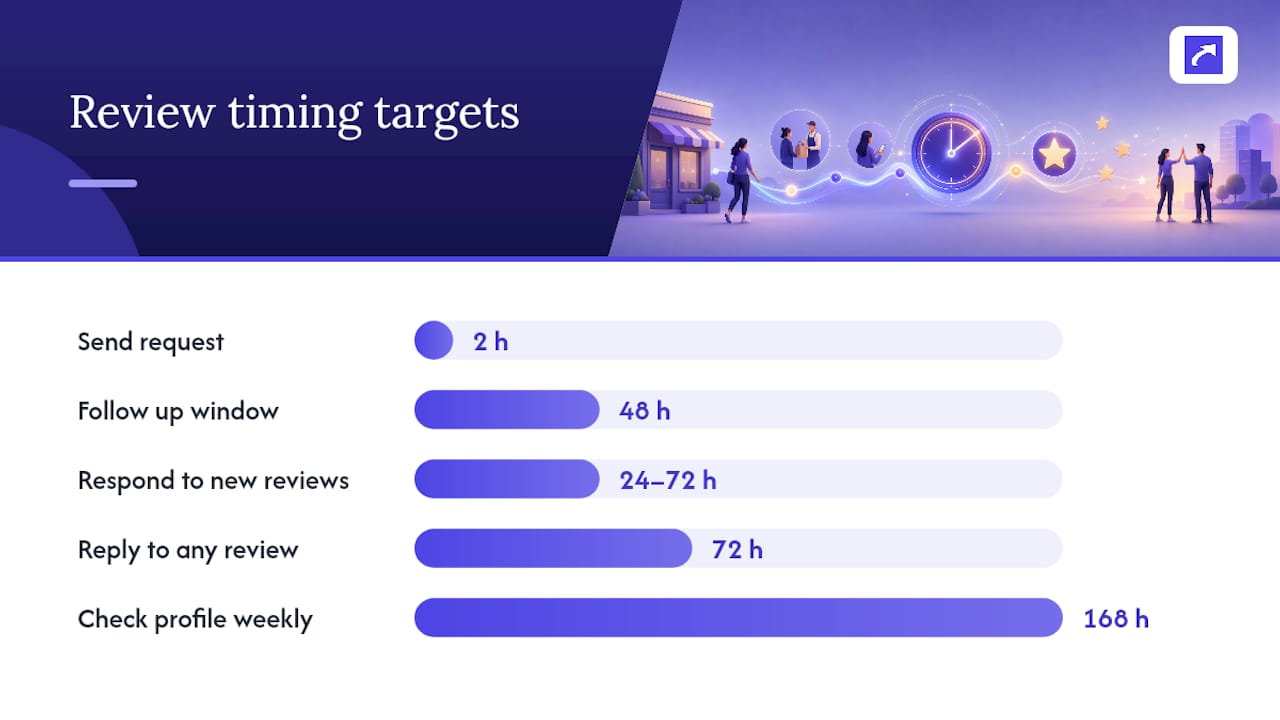
A workable cadence looks like this: send the request within two hours of the transaction closing, follow up once within 48 hours if there's no response, then stop for that transaction. Separately, check your profile weekly for new reviews regardless of whether you sent a request, since some customers leave feedback unprompted.
Responding matters as much as asking. Reply to new reviews within 24 to 72 hours. A quick, specific reply signals to future customers, and to Google's local ranking systems, that the business is active and engaged. A short template works fine: "Thanks for the kind words, [Name]! Glad [specific detail] worked out. Hope to see you again." For negative reviews, acknowledge the issue, avoid getting defensive, and offer to resolve it offline.
- Track requests sent vs. delivered vs. converted, by channel.
- Set a weekly recurring calendar block to check for new reviews.
- Give every review, good or bad, a reply within three days.
- Loop the ask into existing staff scripts and automation triggers rather than treating it as a separate task.
A Real-World Example: Pairing Review Requests With Loyalty Signups
Increasify builds digital loyalty cards for independent coffee shops and local businesses, cards customers save straight to their Apple Wallet or Google Wallet after a quick QR code scan, no app download required. That same signup moment turns out to be one of the best places to slide in a review request, because the customer is already engaged and holding their phone.
At Energy Bar, 50% of customers who signed up for the loyalty program returned within 30 days. That kind of repeat engagement means the loyalty card isn't a one-time interaction. It's a recurring touchpoint, and every touchpoint is another chance to ask for a review without it feeling like a separate, awkward request.
A simple version of this in practice:
- Add the Google review link to the screen customers see right after accepting a loyalty card.
- Print the review QR code on the same receipt that shows their new stamp or points balance.
- Trigger a short, automated SMS a day or two after a new loyalty signup, thanking them and including the review link.
Pro Tip: Don't stack the loyalty pitch and the review ask in the same breath. Let the loyalty signup land first, then follow with the review request a day later. Two asks at once dilutes both.
Why Most Review Request Advice Misses the Point
Most guides on this topic obsess over clever wording, as if the perfect sentence is what separates a five-review month from a fifty-review month. It isn't. The research is pretty consistent: timing and placement do far more work than phrasing ever will. A mediocre message sent within two hours of service will usually outperform a beautifully written one sent three days later.
The bigger gap I see in how small businesses handle this is operational, not creative. They write one good template, use it for a month, then forget about it because nobody owns the process. Review requests need a trigger, tied to a receipt, a checkout screen, or a loyalty signup, not a task somebody remembers to do when things are slow.
If you're starting from zero, don't spend your first week writing templates. Spend it figuring out the single moment in your customer's visit where a request would feel most natural, then automate that one moment before you worry about anything else.
— Vitor